

Best CRM Software’s and Strategies Every Growing Business Must Use in 2026
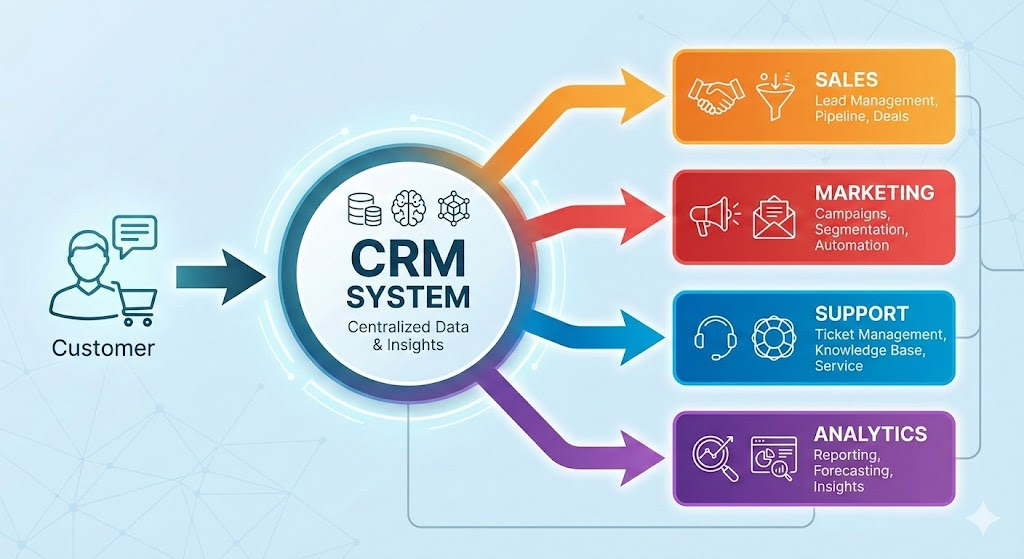
In today’s fast-moving business world, managing customers and prospects effectively is more important than ever. That’s where Customer Relationship Management (CRM) comes in. CRM is both a business strategy and a software system designed to help companies manage all interactions with current and potential customers — whether you’re a small startup, a mid-sized company, or an enterprise.
This guide is designed to provide a complete, beginner-to-advanced understanding of CRM, including software, systems, tools, features, benefits, implementation strategies, and real-world examples making it suitable for business owners, marketers, sales teams, and decision-makers.
Understanding CRM
Customer Relationship Management (CRM) is a system that helps businesses store, track, organize, and analyze customer interactions in one centralized platform.
Instead of using spreadsheets, emails, or disconnected tools, CRM software collects every customer touchpoint from first interaction to post-sale support and presents it in a single unified customer profile.
Modern CRM systems support sales, marketing, and customer service by offering tools such as:
- Lead and contact management
- Sales pipeline tracking
- Workflow automation
- Performance analytics and reporting
- AI-powered insights and forecasting
CRM platforms also integrate with email, live chat, e‑commerce, social media, and customer support systems to create a consistent and personalized customer experience.
CRM ecosystem diagram showing Customer
👉 In simple terms: CRM helps businesses work smarter, sell better, and build long-term customer relationships.
Types of CRM Systems
CRM systems come in different flavors, optimized for various business needs. According to leading CRM frameworks, the common types include:
Operational CRM
Operational CRM focuses on automating daily business processes, including:
- Sales pipeline management
- Lead tracking
- Marketing campaigns
- Customer support workflows
This type of CRM improves efficiency and reduces manual tasks.
Analytical CRM
Analytical CRM collects and analyzes customer data such as:
- Purchase history
- Interaction history
- Customer behavior
It helps businesses with customer segmentation, trend analysis, forecasting, and lifetime value prediction, enabling data-driven decision-making.
Collaborative CRM
Collaborative CRM ensures data sharing and communication across departments — sales, marketing, customer service, and commerce — so every team works with the same customer information.
Strategic CRM
Strategic CRM aligns customer data and interactions with long-term business growth, focusing on retention, personalization, and relationship-building.
| CRM Type | Purpose | Best for |
|---|---|---|
| Operational | Automation | Sales teams |
| Analytical | Insights | Data-driven companies |
| Collaborative | Team alignment | Multi-department orgs |
| Strategic | Long-term growth | Scaling businesses |
Comparison table or infographic explaining CRM types and best use cases
CRM Software & CRM Systems Explained
A CRM system is typically a cloud-based software platform that centralizes customer data and interactions into one secure database.
CRM software stores:
- Contact details (email, phone, address, social profiles)
- Interaction history (calls, emails, meetings, website visits)
- Sales leads, deals, and pipeline stages
- Marketing campaign activity
- Customer service tickets and feedback
All this data is accessible through shared dashboards, allowing sales, marketing, and service teams to work with the same real-time information.
Most modern CRM systems are cloud-based, which means:
- Remote access from anywhere
- Easy scalability
- Lower infrastructure costs
- Faster implementation
| CRM | Spreadsheets |
| Centralized data | Scattered files |
| Automation | Manual updates |
| Real-time insights | Static data |
| Team collaboration | Limited sharing |
| Scalable | Error-prone |
👉 CRM software acts as the digital backbone of customer management, replacing fragmented tools with one integrated system.
CRM Features Every Business Needs
What are the core functions and features a good CRM should offer? Based on leading CRM provider documentation and industry best practices, these are the essential components:
- Contact Management & Unified Customer Profiles: Every customer or prospect’s information — contact details, interaction history, purchase history, support history — stored in one place. This helps teams know exactly who they are dealing with and how best to serve them.
- Lead/Deal/Pipeline Management: Visual pipelines, deal tracking, status updates — letting sales teams track leads from first contact to closure. This gives clarity into the sales process and helps manage opportunities effectively.
- Activity Tracking & Automated Logging: Automatic logging of calls, emails, meetings, notes — so every interaction is recorded without manual entry, preserving full communication history.
- Analytics & Reporting / Data Insights: Dashboards, real-time reports, forecasts, customer behavior analytics, segmentation — empowering businesses to make data-driven decisions, track performance, and plan strategies.
- Marketing Automation & Campaign Management: For businesses with marketing needs — segmenting contacts, sending drip campaigns or email marketing, nurturing leads, tracking marketing interactions — integrated into the CRM.
- Customer Service & Support Ticket Management: Storing service history, support tickets, customer issues — enabling customer service teams to access full context and serve customers effectively.
- Cross-Department Collaboration & Unified Data Access: Multiple departments (sales, marketing, service, commerce) working on the same customer data — avoiding data silos, improving communication, ensuring everyone is in sync.
- Scalability, Customization & Integrations: As your business grows, CRM should grow with it — support more users, data, integrations with other business tools (email, billing, e-commerce, support systems).
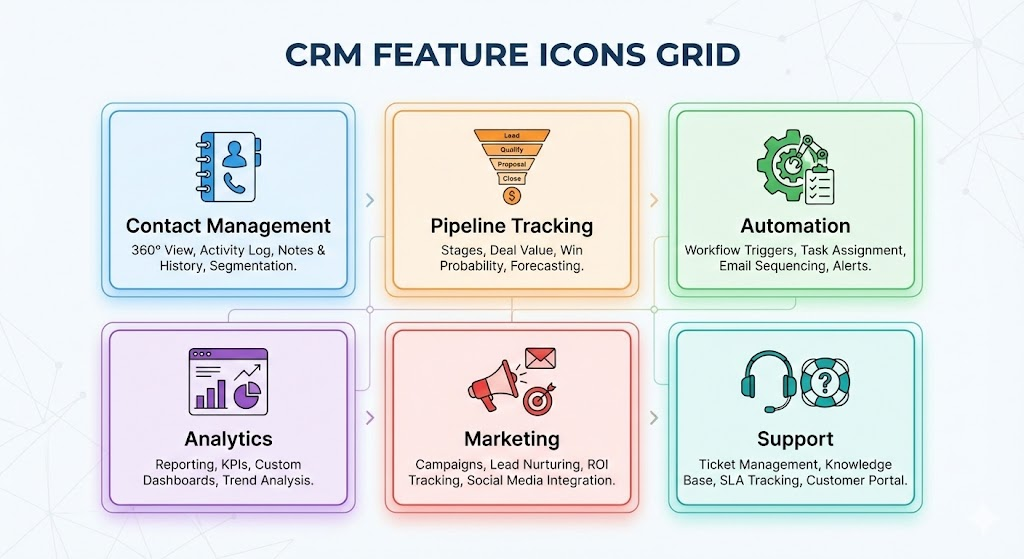
Icon-based feature grid highlighting CRM capabilities
Taken together, these features make CRM not just a contact book — but a comprehensive customer lifecycle management platform: from first interaction (marketing) to sales to post-sale support and retention.
CRM Tools & CRM Software List
Over recent years, many companies have built CRM platforms — each with a different focus. Some aim at small businesses and startups; others target large enterprises needing advanced customization, automation, and analytics. Based on widely used providers, here are some categories of CRM tools in use today:
- Simple / Free CRM for Small Businesses or Startups — Easy to adopt, minimal setup, covers basic needs (contact management, deal pipeline, activity logging). Good for businesses that want to organize customer data without heavy investment.
- Mid-Tier CRM with Sales + Marketing + Service Integration — Platforms that combine lead management, marketing automation, contact management, and support ticketing — suitable for small to mid-sized businesses that want growth and scalability without enterprise-level complexity.
- Enterprise-Grade CRM Systems — Full-featured systems designed for large organizations: advanced reporting & analytics, AI-powered insights, process automation, cross-department collaboration, high customization, integration with many business tools.
Popular CRM platforms that align with these categories include offerings from vendors such as HubSpot (great for small businesses and startups), Salesforce (scalable and enterprise-grade), and other systems offering flexible CRM tools for various business sizes.
When choosing a CRM tool, consider your company’s size, complexity, budget, and desired features — from basic contact management to advanced automation and analytics.
Best CRM for Small Businesses
For many small businesses and startups, investing in a highly complex CRM system may be overkill — what’s more needed is simplicity, ease of use, and flexibility. That’s where lighter, cloud-based CRMs shine.
Because modern CRM systems are often cloud-native and easy to set up, small businesses don’t need to invest heavily in infrastructure or IT resources. They can start with essential features and scale as they grow.
For small businesses — especially those with limited resources — the ideal CRM is one that:
- Offers a simplified interface and easy setup
- Covers core functionalities: contact management, lead tracking, basic reporting, pipeline tracking
- Allows scalability and flexibility as business grows
- Provides reasonable pricing (or even free tiers) to minimize upfront cost
Using CRM early — even in basic form — helps small businesses stay organized, build customer relationships, manage leads more professionally, and prepare for growth without the chaos of disorganized spreadsheets, scattered notes, or disjointed tools.
Best free CRM Software’s: Reviews
Here’s a summary of what major sources highlight about leading CRM platforms — including their strengths, weaknesses, and ideal use cases.
HubSpot CRM — Versatile, Feature-Rich & Great for Small-to-Medium Businesses
According to a comprehensive roundup on all-in-one, HubSpot is repeatedly praised for offering a generous free plan, strong core functionality, and a clean user interface.
Key strengths:
- Even on the free plan, you get access to contact and deal management, pipelines, basic sales tools, and a generous contact limit.
- HubSpot is often listed among the easiest-to-adopt CRMs for small businesses or startups making it appealing to teams with limited resources or CRM experience.
- Its versatility — covering sales pipeline, contact management, integration capabilities makes it a strong baseline, with potential to scale up as needed.
Because of these qualities, many “best CRM” lists designate HubSpot as a top overall choice for small-to-medium businesses or those starting out.
That said, while HubSpot’s free and starter plans are attractive, businesses should evaluate whether advanced needs (automation, analytics, large teams) might eventually require paid plans.
Zoho CRM — Affordable, Customizable & Great for Growing Businesses
On many small business CRM recommendation lists, Zoho emerges as a top contender especially for businesses that expect to scale.
What reviewers highlight:
- Zoho offers a well-rounded feature set including lead & deal management, automation, analytics, and flexibility often at lower price points than enterprise-grade CRMs.
- Its ability to integrate within the broader Zoho ecosystem (other Zoho apps) makes it attractive for businesses seeking an all-in-one suite that grows with them.
- For small to mid-sized businesses, Zoho represents a strong balance between affordability, features, and scalability.
Because of this, many guides recommend Zoho for businesses expecting growth, or those needing a CRM that remains cost-effective while delivering comprehensive functionality.
Bitrix24 — Comprehensive All-In-One CRM + Collaboration, Especially for Teams
This is especially for small businesses or teams is Bitrix24.
Notable advantages:
- Bitrix24 offers a free CRM plan that supports unlimited users — a big plus for small teams or organizations with many collaborators.
- In addition to typical CRM functions (contact/deal management, pipelines), Bitrix24 also includes collaboration tools like task boards, chat, document sharing — effectively blending CRM with project & team management.
- For businesses wanting to centralize not just sales and contacts but also team collaboration and communication, Bitrix24’s all-in-one approach can reduce the need for multiple software subscriptions.
However, some drawbacks exist: as per analysts, the interface can feel overwhelming or “cluttered” due to the many built-in features — which can introduce a learning curve.
Pipedrive — Simple, Sales-Focused CRM with Excellent Usability
For teams whose primary need is managing sales pipelines and keeping CRM light and easy, Pipedrive often comes up as a top “sales-focused” CRM choice.
Why Pipedrive is recommended:
- It provides an intuitive, visual sales pipeline with drag-and-drop deal tracking — making it easy for sales teams to manage leads and deals without complex setup.
- The interface is clean and user-friendly, which reduces the learning curve for small or new teams.
- For small-to-mid sized businesses needing mainly sales tracking (rather than full marketing or service suites), Pipedrive offers a focused, efficient solution without unnecessary complexity.
That said — because Pipedrive emphasizes sales pipeline and simplicity — it may lack some of the deeper automation, marketing, or analytics features that larger or more complex organizations might need.
Mailchimp CRM (Free / Marketing-Focused CRM) — Best for Marketing & Audience Management
Although often thought of primarily as an email marketing tool, Mailchimp offers CRM-style features — especially useful for businesses keen on marketing, segmentation, and customer-audience management without heavy overhead.
Mailchimp’s strengths in CRM context:
- Its free CRM tools let businesses organize contact data, segment audiences, and build marketing campaigns — useful for small teams, startups, or businesses wanting a marketing-centric CRM without investing heavily.
- Through its marketing CRM capabilities, businesses can track engagement, send personalized campaigns, and manage audience data — bridging CRM and marketing automation.
- Because Mailchimp is widely known for email marketing, its CRM offering is particularly appealing for businesses where marketing & outreach are central — e-commerce, small businesses, freelancers, etc.
However, Mailchimp’s CRM is more marketing/audience oriented — it lacks some of the deeper sales-pipeline or enterprise CRM functionality found in full CRM platforms like Zoho, HubSpot, or Bitrix24.
| CRM | Best for | Free Plan | Complexity |
|---|---|---|---|
| HubSpot | Beginners | Yes | Low |
| Zoho | Growing teams | Limited | Medium |
| Bitrix24 | Collaboration | Yes | High |
| Pipedrive | Sales focus | No | Low |
| Mailchimp | Marketing | Yes | Low |
What These Reviews & Comparisons Tell Us — Practical Lessons
From surveying multiple sources and CRM comparison blogs, several patterns emerge regarding how to choose a CRM platform based on business needs:
- Match CRM to business size & purpose: For small businesses, startups, or solo-entrepreneurs — lightweight, free or affordable CRMs (like HubSpot CRM, Mailchimp CRM, Bitrix24 free plan, Pipedrive) often suffice.
- Beware of complexity vs value trade-off: All-in-one CRMs (Bitrix24, Zoho CRM) offer many features — but may require time to learn, or risk overwhelming small teams.
- Clarity of purpose matters: If your focus is sales pipelines and deals → Pipedrive; if marketing & audience engagement → Mailchimp; if long-term growth and scaling → Zoho or Bitrix; if flexibility and full CRM suite → HubSpot or other full-feature CRMs.
- Free plans are valuable entry points: Many CRMs offer free or freemium plans — ideal for testing, small operations, or those starting out, before scaling to paid tiers.
- Ecosystem & integration matter: CRMs that integrate with other tools (marketing, email, project management) or offer add-ons give long-term flexibility and reduce tool fragmentation.
CRM Implementation & CRM Strategy
Implementing CRM is not just about software — it’s about strategy and adoption.
- Centralize Customer Data
- Move data from spreadsheets and scattered tools into one CRM system.
- Automate Workflows
- Use automation to reduce repetitive tasks like follow-ups and data entry.
- Enable Collaboration
- Ensure sales, marketing, and service teams share the same customer information.
- Plan for Scalability
- Choose a CRM that grows with your business.
CRM implementation checklist or workflow diagram
CRM all in one template.
CRM Benefits for Business Growth
Why do businesses across the world adopt CRM? Because the benefits cut across many aspects sales, marketing, customer service, operational efficiency, analytics. Drawing from top CRM providers:
Better Sales Performance & Efficiency
CRM systems help sales teams manage leads and deals more effectively — track pipelines, automate follow-ups, prevent leads from falling through the cracks, and close deals faster.
Improved Customer Service & Satisfaction
With a unified customer profile — capturing past purchases, interaction history, support tickets customer service teams can respond to inquiries quickly and intelligently. They don’t need to dig through multiple systems to find information; everything is already in CRM. That leads to faster resolution times, personalized service, and higher customer satisfaction.
Cross-Department Collaboration & Better Internal Alignment
CRM ensures sales, marketing, service, and other departments are working with the same data. This alignment reduces duplication, miscommunication, and inefficiencies. Teams can share context, avoid information silos, and coordinate outreach, support, and follow-ups more effectively.
Data-Driven Insights & Smarter Decision-Making
With CRM analytics and reporting tools, businesses can gain insights into sales trends, customer behavior, marketing campaign performance, and support metrics. This helps in forecasting, budgeting, customer segmentation, personalized marketing, and strategic planning.
Scalability and Long-Term Growth
Because modern CRMs are often cloud-based and customizable, they grow with your business. As you acquire more customers, expand teams, or add departments, CRM can adapt. That makes it a long-term backbone for customer management, rather than a short-term tool.
How to Choose the Right CRM
- For startups or small businesses, a low-cost or free CRM with core features (contact management, basic pipeline tracking, activity logging) may suffice. You want something easy to set up, simple to use, and scalable.
- For growing businesses or SMEs, you might need mid-tier CRM with more features: marketing automation, reporting, deal management, service ticketing.
- For large enterprises, you may require robust CRM systems: cross-department collaboration, advanced analytics, automation, integrations, high customization, data security, scalability.
Real-World CRM Examples
- Sales CRM: Tracking leads and deals
- Marketing CRM: Email campaigns and segmentation
- Support CRM: Ticket management and service history
- E‑commerce CRM: Purchase tracking and repeat customers
CRM in Marketing & Sales Automation: The Modern CRM Experience
In recent years, CRM has evolved beyond being just a contact or deal tracker. Leading CRM systems now integrate marketing automation, service, commerce, analytics — effectively becoming a central hub for the entire customer lifecycle.
With integrated CRM platforms, companies can run marketing campaigns, track leads, nurture prospects, convert leads to customers, track their support history, manage purchases — all within one ecosystem. This holistic approach ensures consistency and personalization across the entire journey, from first interest to long-term loyalty.
Automation plays a big role: repeating tasks such as follow-up emails, lead assignment, activity logging, pipeline updates — can all be automated. That saves time, reduces manual error, and lets your team focus on high-value tasks like building relationships and strategy.
Furthermore, as customer expectations rise they expect fast, personalized service across channels CRM-enabled businesses are better positioned to meet those expectations. With full customer context available, service agents can respond quickly and effectively, sales reps can personalize outreach, and marketing can tailor campaigns boosting overall satisfaction and loyalty.
Final Thoughts
CRM is no longer a luxury — it is a necessity for modern businesses. The right CRM system helps you organize data, automate processes, improve customer relationships, and scale sustainably.
If you want long-term growth, better customer experiences, and smarter decision-making — CRM is the foundation.
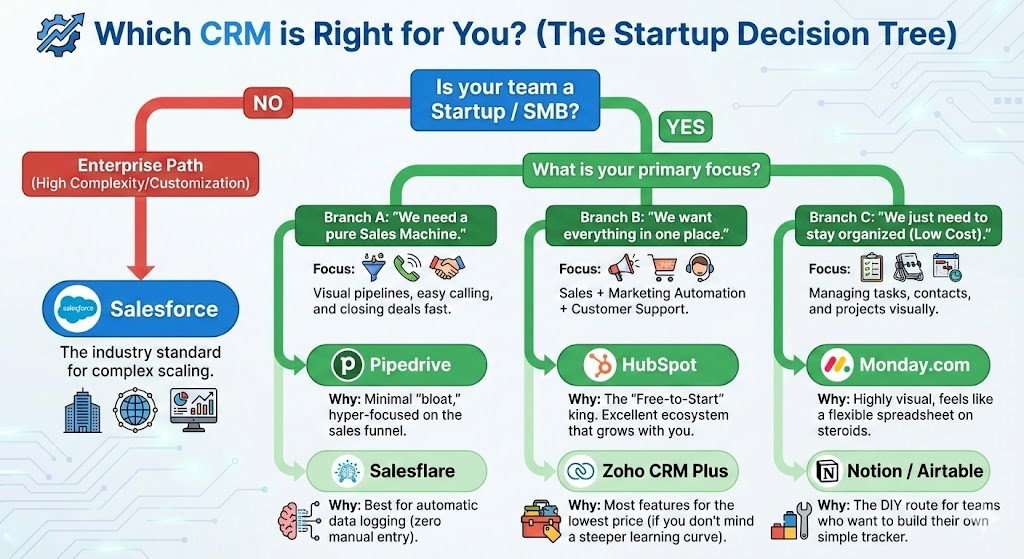
Which CRM is best for you.
Takeaway — Your CRM Strategy & Next Steps
If you’re ready to implement CRM for your business (or blog about it), here’s a simple plan:
- Define your business size, needs, and priorities — small business vs enterprise; sales focus vs service vs marketing.
- List the core features you need now, and those you might need as you grow (contact management, pipeline, marketing automation, service, analytics).
- Start with a simple CRM (cloud-based, easy to adopt) if you’re small — get your team used to the system.
- Measure impact: track time saved, sales growth, customer satisfaction, lead conversion, service resolution times.
- Scale gradually — as needs grow, add integrations, automation, more advanced features, or migrate to a more advanced CRM.
By following this strategy, you maximize the benefits of CRM without over-investing or complicating your workflows.
Summary of Key Concepts
CRM = Customer Relationship Management — a strategy + software to manage all customer interactions and data.
What CRM means: Managing customer relationships using data and automation
Who uses CRM: Startups, small businesses, enterprises
Main Purpose of CRM: CRM systems unify customer data, track leads and deals, automate tasks, and support marketing, sales, support, and analytics.
Types of CRM: Operational, Analytical, Collaborative, Strategic — each serving different business needs.
Core features: contact management, deal pipeline, activity tracking, analytics, marketing automation, customer service, cross-department collaboration.
CRM tools range from simple / free (great for small business) to enterprise-grade (powerful, scalable, customizable).
Benefits: increased sales efficiency, improved customer service and retention, better collaboration, data-driven decision-making, scalable business growth.
Choosing the right CRM depends on business size, needs, budget, and growth strategy.
CRM is essential — especially in a competitive, customer-centric, multi-channel business environment.
Popular CRM tools: HubSpot, Zoho, Salesforce, Pipedrive
Frequently Asked Questions (FAQ)
What does CRM stand for?
CRM stands for Customer Relationship Management.
What is CRM software used for?
CRM software manages customer data, sales pipelines, marketing campaigns, and customer support interactions in one system.
Is CRM only for large companies?
No. CRM is widely used by startups and small businesses to organize leads, automate follow-ups, and scale operations efficiently.
What are the main types of CRM systems?
The four main types of CRM are Operational CRM, Analytical CRM, Collaborative CRM, and Strategic CRM.
What is the best CRM for small businesses or startups?
If you are a small business, startup, or just beginning, HubSpot CRM or Pipedrive are excellent choices. They are easy to use, cost-effective, and focus on essential features like contact management and sales pipelines.
Which CRM is best for growing businesses?
If you expect your business to grow and need more flexibility, automation, and scalability, Zoho CRM or Bitrix24 offer a strong balance of advanced features, customization, and affordable pricing.
Which CRM is best for marketing and email engagement?
If your primary focus is marketing, outreach, audience segmentation, and email campaigns, Mailchimp CRM works well—especially if you do not require advanced sales pipeline management.
Can CRM help increase sales and customer retention?
Yes. CRM helps businesses track leads, automate follow-ups, personalize communication, improve customer service, and build long-term customer relationships.

