

7 Powerful Business Automation Strategies That Skyrocket Small Business Productivity (Step by step guide)
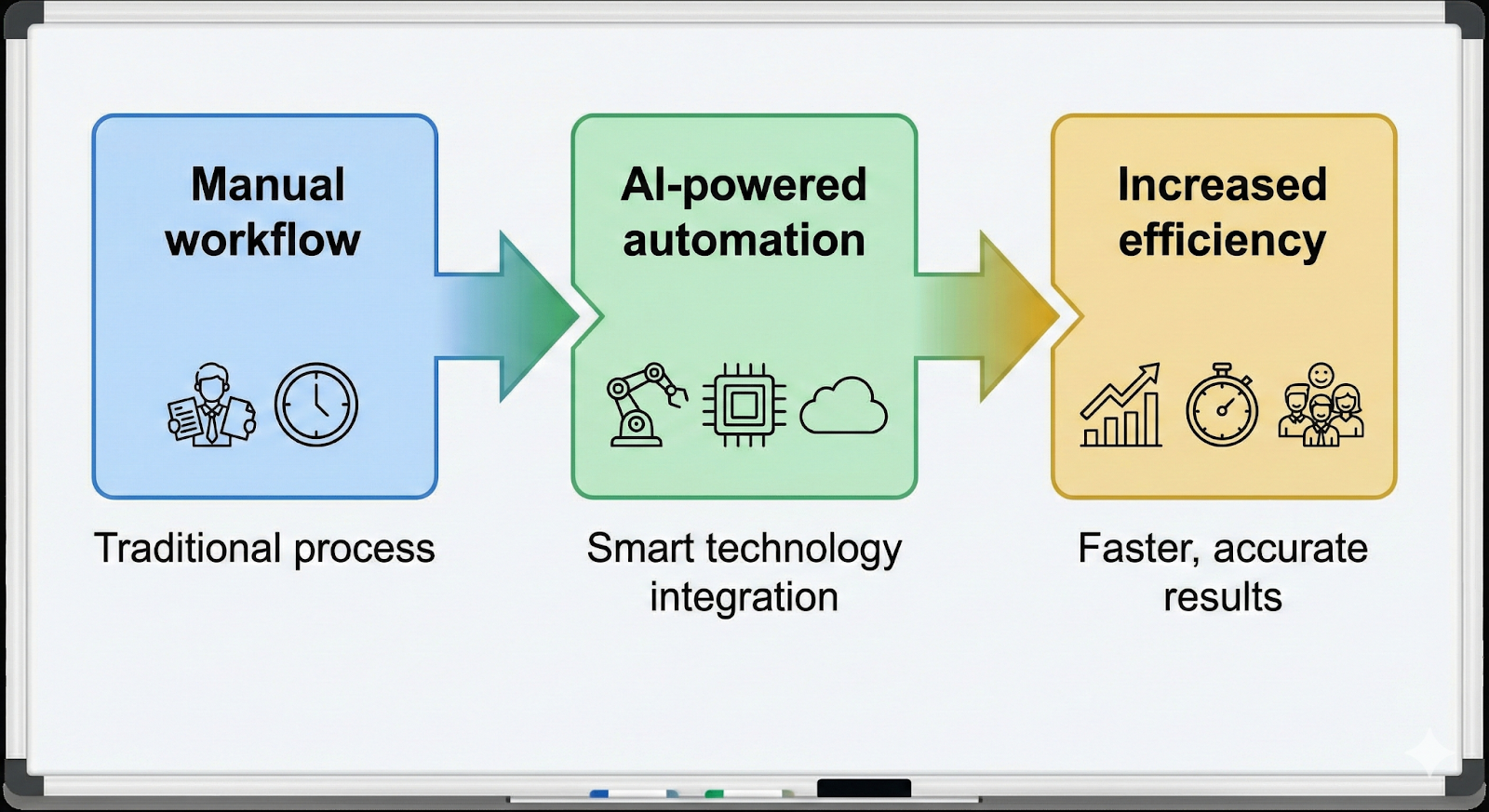
In 2026, automation is no longer optional it’s essential. AI-powered automation is now used globally, with 78% of businesses integrating AI into at least one process, and generative AI adoption growing from 33% to 71% in a single year (Contently). Whether you run an ecommerce brand, digital agency, or SME in Pakistan, India, or beyond, automation can save time, reduce errors, and scale operations efficiently.
1. What Is Business Automation?
Business automation (also called business process automation or BPA) uses software and AI tools to automatically handle repetitive, manual tasks, freeing your team to focus on higher-value work and growth. According to Salesforce, many workers spend up to one-third of their time on routine tasks and Automation tools cut that load dramatically.
Examples by Function
- Marketing: Automated email sequences, abandoned-cart reminders, and social media scheduling let campaigns run without manual intervention.
- Sales: Tools like Salesforce’s RPA and Workflow Builder automatically update CRM records, score leads, and trigger follow-ups when prospects take action.
- Operations: Inventory tracking, automated invoicing, and document generation keep order fulfillment running smoothly with minimal human oversight.
- Customer Support: AI chatbots and automated ticket routing ensure quick replies and proper queueing without manual sorting.
- Finance: Subscription billing, payment reminders, and expense tracking can be handled automatically to cut errors and save time.
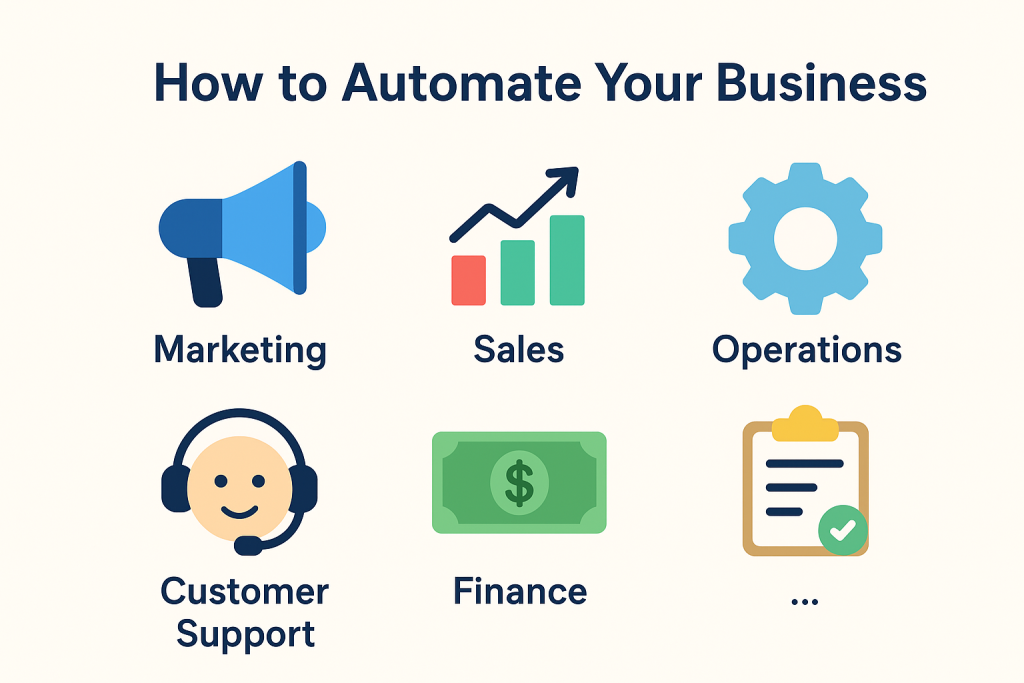
Why It Matters: Business automation is not just “nice to have” it’s how modern companies handle complexity at scale by reducing repetitive work and improving workflow speed and accuracy across the organization.
2. Why Automating Your Business Matters in 2026
Automation isn’t theoretical it delivers measurable results. According to the U.S. Chamber of Commerce businesses estimate that automating routine tasks can save employees up to 240 hours per year and leadership up to 360 hours annually in time otherwise wasted on mundane tasks.
Top Benefits You Can Quantify
- Saves Time: Employees could save 30% or more of their time by automating routine work equivalent to gaining weeks of productivity back each year.
- Reduces Human Error: Automation dramatically cuts mistakes in one Automation Anywhere case, error rates shrank to just 0.05% in billing transactions.
- Lowers Costs: Automating routine tasks can replace the equivalent cost of hiring extra staff Salesforce reports organizations save up to 40% compared with manual process alternatives.
- Improves Customer Experience: Faster responses and accurate data lead to smoother client interactions and higher satisfaction.
- Helps You Scale: With automation tools doing the heavy lifting, you can handle increased demand without proportional increases in headcount.
Well-implemented automation boosts productivity, reduces costs, and gives your team back its time measurable outcomes, not just theory.
3. Processes You Can Automate Today
Below are real examples you can implement now many supported by platforms like Salesforce and Automation Anywhere.
3.1 Marketing Automation
- Welcome email sequences and abandoned cart reminders run automatically based on triggers.
- Social media scheduling tools post consistently without manual scheduling.
- Customer segmentation and lead nurturing workflows make sure prospects always move through your funnel efficiently.
Impact: Leaders estimate automation can save 240 hours per year per employee by removing repetitive tasks.
3.2 Sales Automation
- Lead scoring and CRM updates: Tools like Salesforce RPA automatically sync data and score new prospects based on behavior without manual input. Salesforce
- Proposal generation, meeting reminders, and follow-up sequences free sales teams from repetitive admin work.
Example: Users report Salesforce automation can cut 40–50% of the time they spend on data management and sales admin.
3.3 Operations Automation
- Inventory updates and reorder alerts trigger when stock levels fall, preventing stockouts or overstock.
- Invoicing and task assignment get automated through workflow tools, reducing delays.
Impact: McKinsey found that automating routine tasks could save 30% of employees’ time, boosting overall throughput.
3.4 Customer Support Automation
- AI chatbots respond instantly to FAQs and general requests.
- Automated replies and ticket routing ensure tickets reach the right team without manual sorting.
Stat: Automation is expected to power 95% of all customer interactions by 2025, so adopting bots now keeps you competitive.
3.5 Finance Automation
- Payment reminders and subscription billing run on schedule, reducing late payments and lost revenue.
- Expense tracking happens automatically, so you get better visibility into spending.
Example: In automation case studies, companies reduced billing processing time by 40% and nearly eliminated errors — reducing error rates to around 0.05%.
Each department passes data to the next through automated triggers — reducing handoffs, eliminating manual errors, and saving hours every week.
4. Step-by-Step: How to Start Automating Your Business
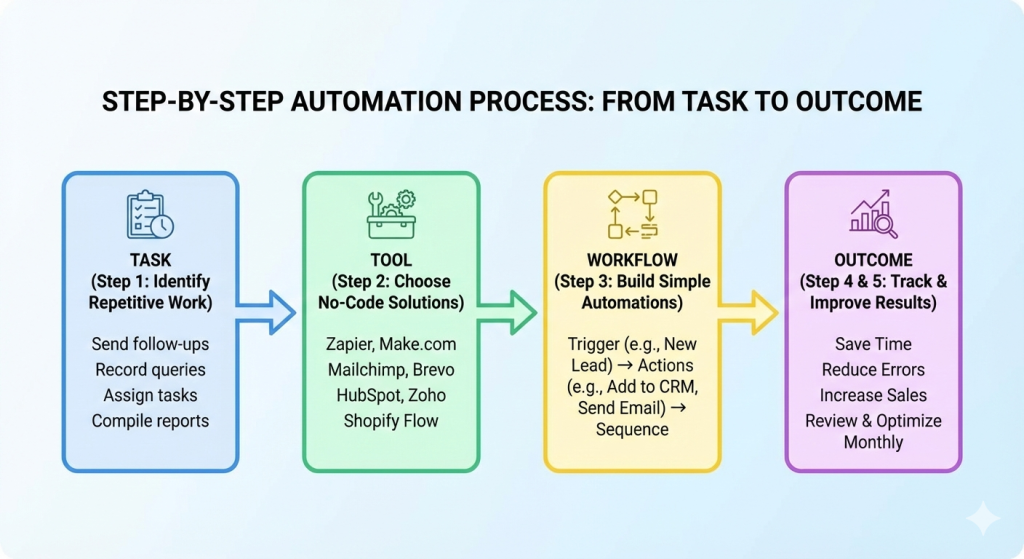
Most competitors explain what automation is, but not clearly how to begin. Based on practical automation guides, here’s a simple process you can follow:
Step 1: Identify Tasks You Repeatedly Do
Before you automate anything, list out the tasks that you or your team do over and over — these are where automation pays off fastest. According to automation experts, start by looking at the most repetitive work because that’s where you save the most time and reduce errors.
Common examples to list:
- Send follow-ups after customer inquiries
- Record customer queries manually
- Assign tasks to team members
- Download or compile reports
- Track inventory changes
The idea is simple: if you or someone on your team does the same task every day or week, it’s a candidate for automation.
Step 2: Choose Affordable, No-Code Automation Tools
Once you know what to automate, pick tools that match your budget and skills. Leading guides recommend starting with no-code platforms so you don’t need developers.
| Category | Tool Suggestion for business automation (Budget Friendly) |
|---|---|
| Email Automation | Mailchimp Free, Brevo, MailerLite |
| Workflow Automation | Zapier Free, Make.com Free |
| CRM | HubSpot Free, Zoho CRM Free |
| Social Media | Buffer, Publer |
| Ecommerce Automation | Shopify Flow, WooCommerce Plugins |
| Accounting | QuickBooks, Xero, Wave Free |
| AI Assistants | ChatGPT, Botpress, Tidio AI |
Start with tools that integrate with each other so you can connect workflows across departments with minimal setup.
Step 3: Build Simple Automation Workflows First
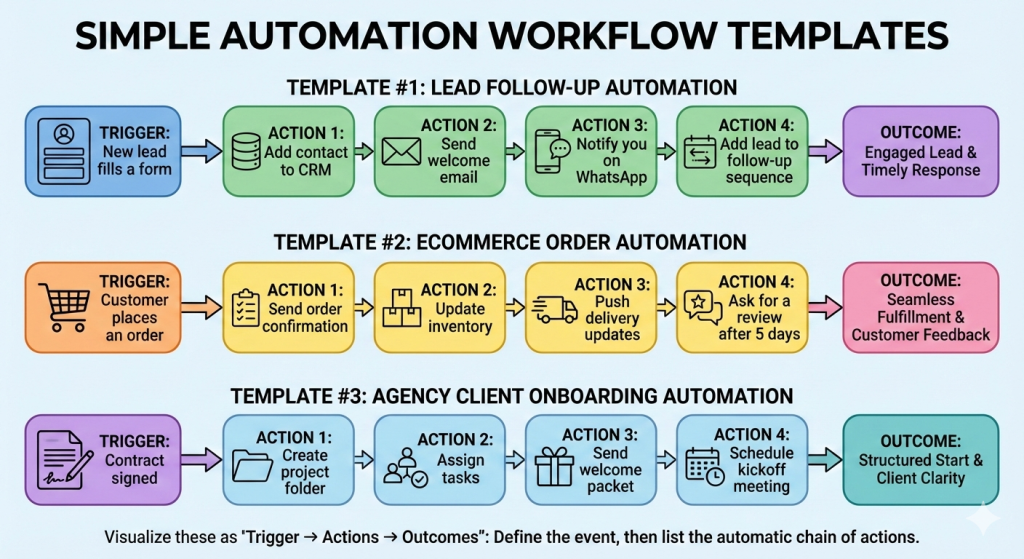
Don’t automate everything at once. Start with one workflow template that delivers obvious results.
Template Example #1: Lead Follow-Up Automation
- Trigger: New lead fills a form
- Actions:
• Add contact to CRM
• Send welcome email
• Notify you on WhatsApp
• Add lead to a follow-up sequence
Template Example #2: Ecommerce Order Automation
- Trigger: Customer places an order
- Actions:
• Send order confirmation
• Update inventory
• Push delivery updates
• Ask for a review after 5 days
Template Example #3: Agency Client Onboarding Automation
- Trigger: Contract signed
- Actions:
• Create project folder
• Assign tasks
• Send welcome packet
• Schedule kickoff meeting
Step 4: Expand Automation Into Larger Workflows
Once you have a few simple automations working well, start connecting them into broader processes:
- Reporting automation (daily/weekly dashboards)
- Social media scheduling + responses
- Customer lifecycle automation (from lead to repeat buyer)
- Finance workflows (like automated invoicing and payment reminders)
By expanding gradually, you avoid overwhelming your team and can adjust as you go.
Step 5: Track Performance & Improve
Automation should evolve. Build a simple review process check workflows every 30 days and optimize them.
What to do each month:
- See if any automations are creating errors
- Remove unnecessary steps
- Adjust triggers or conditions for better outcomes
Regular reviews ensure your automation remains aligned with business goals instead of becoming outdated or redundant.
5. Industry-Specific Automation Use Cases
To make this section practical for readers, here’s how different business types benefit from automation based on common use cases identified across competitor guides:
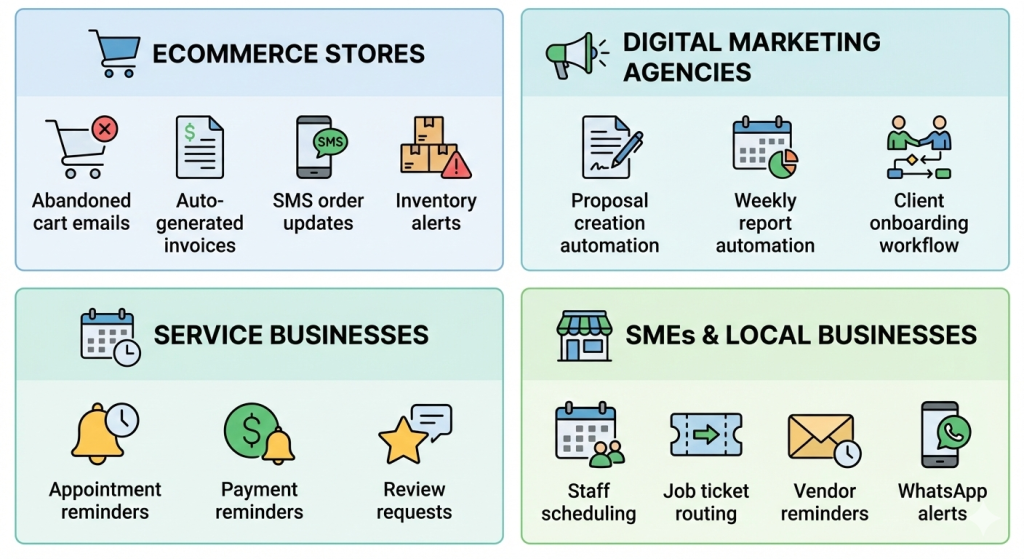
Ecommerce Stores
- Abandoned cart emails
- Auto-generated invoices
- SMS order updates
- Inventory alerts
Automating these reduces manual tracking and increases sales for example, automated order updates can cut support tickets because customers stay informed.
Digital Marketing Agencies
- Proposal creation automation
- Weekly report automation
- Client onboarding workflow
For agencies, automations that handle repetitive reporting and client setup can save many hours per month, letting teams focus on strategy instead of busywork.
Service Businesses
- Appointment reminders
- Payment reminders
- Review requests
Businesses such as salons, consultants, or repair services benefit when reminders and follow-ups are automated, reducing no-shows and improving cash flow.
SMEs & Local Businesses
- Staff scheduling
- Job ticket routing
- Vendor reminders
- WhatsApp alerts
Small businesses can automate everyday coordination tasks to keep operations smooth and reduce the need for manual check-ins.
7. Ready-to-Use Automation Templates
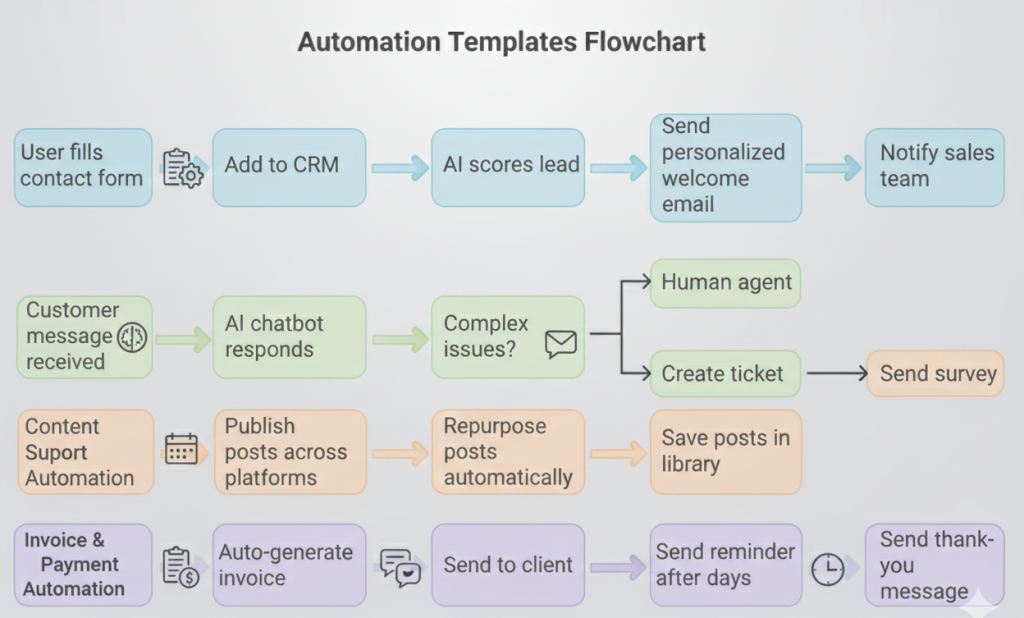
Template 1 — Lead Qualification
Trigger: User fills contact form
Actions:
- Add to CRM
- AI scores lead
- Send personalized welcome email
- Notify sales team
Template 2 — Customer Support Automation
Trigger: Customer message received
Actions:
- AI chatbot responds
- Complex issues → human agent
- Create ticket
- Send survey
Template 3 — Social Media Automation
Trigger: Content added to calendar
Actions:
- Publish posts across platforms
- Repurpose posts automatically
- Save posts in library
Template 4 — Invoice & Payment Automation
Trigger: Project completed
Actions:
- Auto-generate invoice
- Send to client
- Send reminder after 3 days
- Send thank-you message
8. Business Automation Checklist
A practical checklist helps you make sure you’re not skipping essential automation steps — from spotting tasks to refining live workflows.
Step 1: Identify Tasks
Before you automate anything, make sure the work qualifies:
✔ Repetitive: Happens regularly and doesn’t require creativity.
✔ Time-Consuming: Takes valuable hours that could be better spent elsewhere.
✔ Error-Prone: Humans tend to make mistakes on these tasks.
Best practice: Start by mapping your current workflows so you can spot redundancy, delays, or manual handoffs. Documenting this makes it easier to know what should be automated first.
Step 2: Select Tools
Choosing the right tools sets the foundation for reliable automation.
✔ Email tool: For automated alerts and sequence Request Information (e.g., campaign or follow-up emails).
✔ CRM tool: To automate data entry, lead tracking, and reminders.
✔ Automation platform: Connects services and triggers workflows without coding.
✔ AI chatbot: For instant responses and support automation.
✔ Finance software: To automate billing, invoices, and payment follow-ups.
Best Tip: Make sure tools integrate well and your team knows how to use them before rolling out automation broadly. This avoids bottlenecks from incompatible systems or lack of adoption.
Step 3: Build Workflows
Once you’ve identified tasks and tools, design the sequence that will run automatically.
✔ Lead follow-up: Triggered when a new inquiry arrives — add to CRM, send a welcome message, and move through nurture sequences.
✔ Customer onboarding: Once a contract is signed — create tasks, share onboarding info, set reminders.
✔ Reporting: Generate reports on a set schedule instead of manually every week.
✔ Social media scheduling: Posts go live at planned times without a person pushing publish.
✔ Payment reminders: Automatically alert customers when invoices are due.
Best Tip: Mapping workflows visually helps you spot missing steps and ensures you’re automating end-to-end processes, not just fragments.
Step 4: Test & Improve
Every automation needs quality checks and tuning:
✔ Fix delays: Look for steps that lag or stall.
✔ Review analytics: Use dashboards to see if automation is meeting goals like time saved or error reduction.
✔ Optimize timings: Adjust trigger conditions and delays based on real performance.
✔ Remove unnecessary steps: Over-automation can hurt efficiency if workflows become too long or tangled.
Regular testing — especially after changes in tools or team responsibilities — is key to keeping workflows running smoothly.
Why This Checklist Works
This structure matches what growth automation experts recommend for small and mid-sized businesses:
- Start with tasks you actually do (and repeat often),
- Match them to tools that simplify work,
- Build logical, connected steps (workflows),
- Then monitor and refine continuously.
Using a checklist like this ensures you don’t skip vital steps and can measure the impact of your automation over time.
Download the Business automation checklist to start today.
Conclusion & Call-to-Action
Automation isn’t just for big companies. With today’s no-code and AI tools, even small businesses can automate:
- Sales
- Marketing
- Operations
- Customer service
- Finance
Start small, build workflows, track performance, and scale smartly. With AI workflows, your business runs smoother, faster, and more profitably while freeing up your time to focus on growth. Learn more..
Download the Business automation checklist to start today.
FAQ Section.
AI business automation uses artificial intelligence tools to handle repetitive tasks like marketing, sales follow-ups, customer support, and operations without manual effort.
Small businesses can automate workflows by:
- Identifying repetitive tasks
- Using no-code tools like Zapier or AI chatbots
- Connecting apps through automation triggers
- Monitoring and optimizing workflows regularly
No. Many affordable and no-code tools allow startups to automate processes at low cost. Businesses can start small and scale automation gradually.
tart with:
- Email marketing sequences
- Lead qualification
- Invoice generation
- Customer support responses
- Social media scheduling
These tasks provide the fastest ROI
Yes. AI automation reduces manual errors, speeds up lead response time, improves customer experience, and allows teams to focus on growth activities — which directly increases revenue.
pular tools include:
- CRM automation platforms
- Marketing automation tools
- AI chatbots
- Workflow connectors like Zapier
- No-code automation builders
Choose tools based on your business size and budget.
Basic workflows can be implemented in a few hours. Advanced automation systems may take several days depending on complexity.

